
Community result preview
SeedVR2 · Online image & video upscaler
Upscale images and videos online
Choose your file. Check the result before a bigger job. No GPU or ComfyUI setup.
Or drop your image or video here
JPEG, PNG, WebP · MP4, WebM
Max 1000 images•Max 100 videos•Total max 2GB
Eligible new accounts can try one 2K image or a 5-second video sample. Sign in after choosing your file; full video costs are shown before payment.
See pricingOne-step inference — faster in supported workflowsBenchmark-tested upscaling qualityDrag, drop, paste — it just works
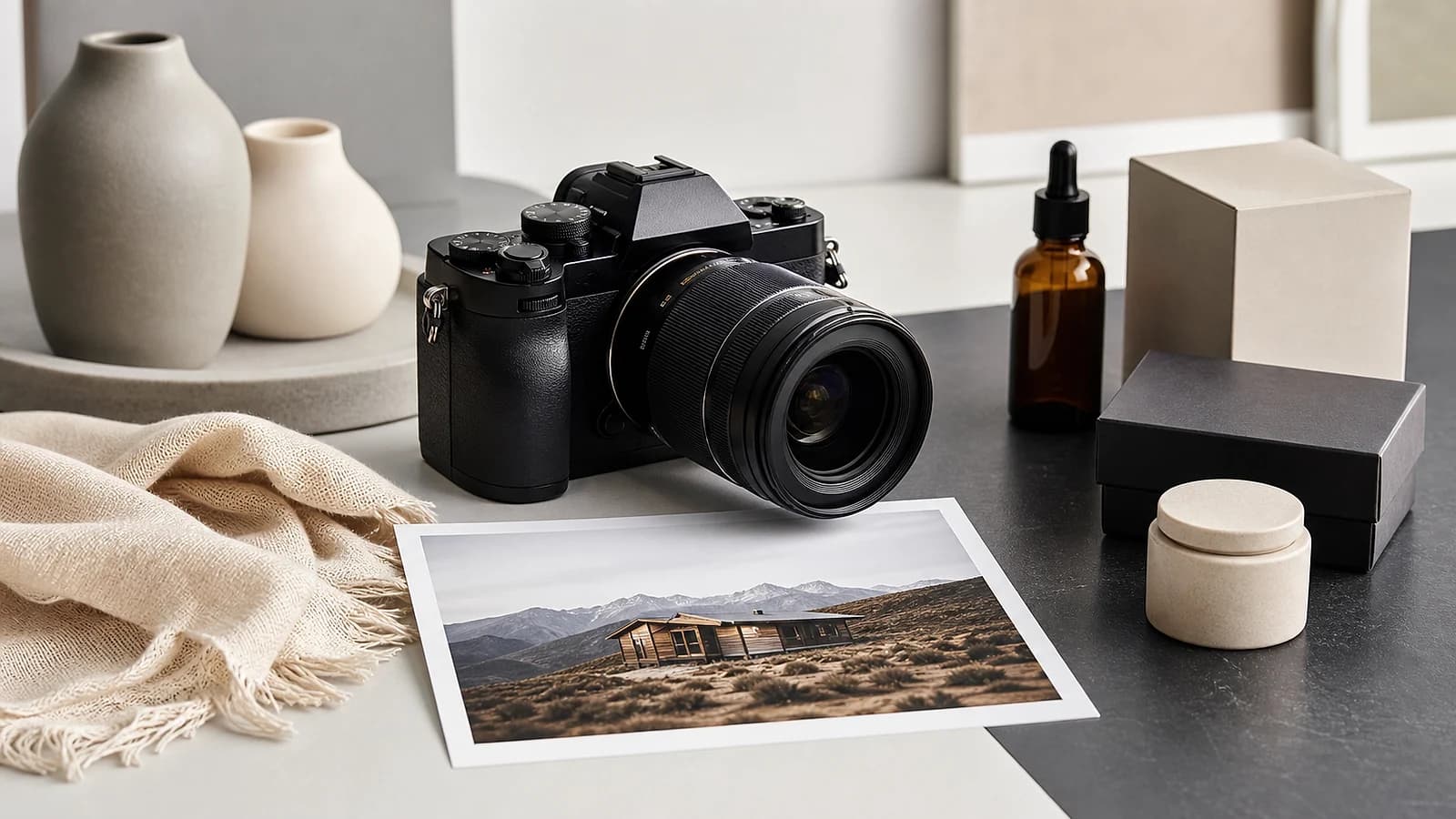

Photographic before / after
Compare the same scene before and after enhancement
Use the slider to inspect the same 1600 × 900 camera-and-product scene before and after enhancement. This internal-library example makes the visual comparison clear without using customer media.
- Both files
- 1600 × 900
- File format
- WebP
- Slider alignment
- Same scene
- Asset origin
- Internal library
AI image upscalerChoose a local image and keep it through sign-in. If the account is eligible, the first 2K result is processed and delivered free.Upscale an image freeKnow the charge before you buyCompare monthly subscriptions and one-time credit packs, including the full amount charged today.See exact pricing
SeedVR2 Pricing: Credit Packs, Plans and Per-Video Costs
SeedVR2 image and video costs: 2K images cost 10 credits, a 5s 720p video starts at 45 credits on Standard (165 on SeedVR2). First signed-in 2K image free.
Deliver complete client batches
Turn one credit purchase into product listing sets, short-video tests, and social-ready image batches instead of buying each task separately.
Know which video lane you are buying
The homepage SeedVR2 workflow and every model in the unified video selector show their own minimum before you run a job.
Keep one-time credits until you use them
Public one-time pack credits do not expire. Subscription credits follow their billing period. Confirmed system or provider failures trigger a credit-return attempt.
One-time credits
$9.99
$9.99 billed once
200 creditsThis plan can run 20 2K images / 4 5s 720p clips≈ 20 images at 2K≈ 4 Standard 5-second 720p video jobs
For short video jobs: 200 credits covers about 4 minimum 5-second Standard 720p upscales. One-time; no subscription.
- The lowest-cost entry pack for video jobs
- One payment; credits never expire
- Credit return for confirmed system or provider failures
Purchased credits do not expire unless checkout states otherwise. Unused credit packs may be eligible for refund within 14 days. Confirmed system or provider failures trigger a credit-return attempt.
Most popular
Subscription plan
$118.80
$118.80 billed yearly ($9.90/month equivalent)
$1.24/100 credits
This plan can run 960 2K images / 213 5s 720p clips
Pay about 6.0–6.3 monthly fees for 8 months of credits. Credits arrive upfront and remain usable through the paid annual period.
Auto-renews yearly. All 9,600 credits are delivered immediately and expire at the end of the paid annual period. Review the refund policy before purchase.
Free plan
$0
An eligible signed-in account can finish and receive one 2K image free. Later image and video jobs use the live credit table.
Enhance one image free
Daily login: +2 credits
One eligible 2K image processed and delivered free
The first eligible signed-in 2K image is processed and delivered free. Daily login credits (2) cannot finish another 2K file (10 credits). Later jobs use the live credit table. Same model family as WaveSpeed or fal; this site does not sell a $0.01 API run.
Secure checkoutStripe
A confirmed system or provider failure triggers an automatic credit-return attempt.
Cancel your subscription anytime from billing.
ComfyUI Cloud Alternative
Tired of 8GB VRAM Out-of-Memory (OOM) Errors in ComfyUI?
Skip CUDA driver hell, package dependency conflicts, and local GPU crashes. Enhance images and videos at full FP16 precision on cloud GPU clusters with zero setup.
Video credits depend on the workflow and actual model you choose
Homepage SeedVR2 video workflow: 5-second 720p minimum from 165 credits.
Unified selector · Standard model: 5-second 720p minimum from 45 credits.
Unified selector · Pro model: 5-second 720p minimum from 165 credits.
Studio & Enterprise Volume
Dedicated Volume Contracts for Production Studios
For studios and agencies with recurring restoration or upscaling work. Start with a scoped pilot before committing to a full batch.
Annual contracts from $2,000/year
One representative sample before the full-batch quote
Output scope and delivery window agreed up front
Annual terms and usage limits set in your quote
Human quality review and agreed revision boundaries
The annual minimum is a starting commitment, not an unlimited credit pack. Final price, accepted volume and delivery terms are confirmed in your individual quote.
Request Studio Volume ContractCompare annual minimums and service scopeDescribe the project in your browser. No charge or file upload to request a quote.
Estimate credits before you buy
Choose the workload that looks like your next batch. The estimate uses the same credit rules as the tools, then points you back to the smallest credit pack that can cover it.
Estimated workload
45 credits
1 video(s) · 45 credits each
- Estimated time
- 40s–1m 3s
- Estimated output size
- 5.0 MB
Estimate, not a measurement: Standard is configured at about 10s of processing per second of footage. Queue load and source complexity move the real time inside this band.
Per hour of source footage: 32,400 credits. A two-hour tape is 12 submissions of at most 10 minutes each, about 64,800 credits in total.
A confirmed system or provider failure triggers an automatic credit-return attempt.
Time and size are planning estimates. The live preflight is the source of truth before you spend credits.
Recommended: Video Starter
200 credits delivered. Select it above and continue to checkout when ready.
SeedVR2 creator results
How teams use SeedVR2 in production
Examples from creators who choose image upscaling, one of five clearly named video models, or the specialized phone and cartoon workflow.
Choose the workflow that fits the job
Clear choices before you spend credits
Start with still images, compare five video models in one place, or use the specialized vCube route for phone and cartoon footage.
Image output
2x/4x
Dedicated still-image upscaling for portraits, product shots, and reference frames.
Video delivery
4K
Standard, FlashVSR, SeedVR2, Pro, and Ultimate show their names and costs before submission.
Focused lanes
3
The shared workspace, unified video selector, and specialized cartoon workflow each serve a clear intent.
First eligible 2K delivered free
One photo in, a finished 2K image out
Start with a still image and let SeedVR2 finish the 2K output. An eligible account receives the first result free; later images and videos use the displayed credit cost. vCube stays available for phone and cartoon footage.
The model shown before submission is the model recorded and sent to the provider.
2x / 4x
Image upscaling options
Delivered
Eligible first 2K after processing
First 2K
Free for an eligible account
Restore a photo
Upload one still image. If the account is eligible, its first 2K result is processed and delivered free; later jobs show the cost before submission.
Process one imageVideo upscaler
Compare Standard, FlashVSR, SeedVR2, Pro, and Ultimate with exact costs before submission.
Compare video modelsPhone and cartoon video
Use vCube scene presets and frame-rate controls for animation, social video, and archive footage.
Open specialized workflowSeedVR2 FAQ
Common questions about the SeedVR2 image and video upscaling workspace
SeedVR2 is an independent browser workspace for image upscaling, video cleanup, and 4K delivery. It keeps billing, queue tracking, and downloads in one place while sending each job to the matching workflow.
Because still-image upscaling, the five-model video comparison, and the specialized cartoon workflow are different jobs. Each page now has one clear purpose.
Use the image upscaler for portraits, product shots, thumbnails, screenshots, and reference frames. It is tuned for 2x and 4x enlargement instead of long-form clip cleanup.
Open the unified video selector and start with Standard on a short representative clip. Compare another model only if Standard does not improve the difficult motion or compression artifacts.
Test Pro inside the same video selector when the clip is headed for a demanding delivery. Compare the same short segment first—a higher price does not guarantee a better result for a heavily compressed source.
SeedVR2 accepts common still-image formats such as JPG, PNG, and WebP plus common video formats such as MP4 and WebM. The exact limits are shown in the tool before you upload.
Each workflow shows its own credit estimate before you submit. Image upscaling is usually priced by scale or output size, while video jobs are priced by the selected delivery lane and resolution.
Yes. My Creations lets you reopen recent source files and finished outputs, then switch between the image workspace, unified video selector, and cartoon workflow without starting from zero.
The workflow keeps request identifiers behind the scenes so retries can recover an in-flight job instead of creating a second bill for the same submission.
Most image jobs finish quickly. Video jobs depend on clip length, target resolution, and queue depth. The tools surface progress and estimated timing while the job is running.
The research weights can be self-hosted. This site is a hosted browser. An eligible signed-in account can process and receive its first 2K image free. Daily login is 2 credits and cannot fund another 2K image (10 credits), so later jobs use paid credits. Same SeedVR2 family as the API; you are paying to skip the wiring.
Daily refresh credits reset on schedule and are used before your paid balance. They do not roll over forever, so think of them like today's coupon rather than a permanent wallet top-up.
Video upscaling by use case
AI video upscaler in your browserUpload a short clip, review motion, and see the credit cost before you pay.Free video upscaler trialEligible accounts run one 5-second 720p sample on the live engine before paying.4K video upscalerCheck the Pro 4K minimum and review a test scene before processing a full edit.Video enhancer for soft or compressed clipsClean up compression and softness, then export up to 4K from the browser.Restore old family and archive footagePrepare the source, test one scene, and keep the original beside the improved cut.VHS to 4K for a box of tapesDeinterlace the capture first, test one scene, and price each tape in credits per minute.Anime video upscalerProtect line art, flat colors, subtitles, and motion consistency while upscaling.SeedVR2 vs Topaz Video AICompare both routes on cost, hardware, and privacy before you commit.
SeedVR2 upscaler guides
SeedVR2 Upscaler: Restore Old Video to 1080p or 4K OnlineUpload a short clip and the SeedVR2 upscaler restores it to 1080p or 4K in the browser: no local install, no GPU, and no ComfyUI setup.Seedrv2 or SeedVR2: ByteDance Video RestorationSeedrv2 is a common misspelling of SeedVR2, ByteDance's open-source video restoration model. See what it does and how to upscale a clip in the browser.SUPIR vs SeedVR2: Image Restoration or VideoCompare SUPIR image restoration with SeedVR2 video upscaling on modality, license, VRAM, and deployment. Decide which fits your footage first.SeedVR2 Upscaler Download: There Is No App to InstallThere is no SeedVR2 upscaler app to download. Use the hosted browser upscaler and download your finished 1080p or 4K output. No local install or GPU required.
Latest Blog Articles
Read upscaling guides, workflow notes, and delivery tips for image and video cleanup
Need a result now instead of a guide?AI image upscalerAI video upscaler

Batch Workflows
Batch Upscale Photos: A Workflow for Whole Folders
Batch upscale photos with SeedVR2: homepage batch limits, the photo-enhance tool's 10-photo batches, per-image credit math, and a credit-saving prep checklist.
Read more →
Cloud vs Desktop
Cloud vs Desktop Video Upscaling: SeedVR2 vs Topaz
Browser-based upscaling versus a desktop suite: hardware requirements, pricing after Topaz ended perpetual licenses, privacy, and which one fits your workflow.
Read more →
Video Upscaling
How to Fix Compressed WhatsApp Video Quality
Why WhatsApp and WeChat crush video quality, what AI upscaling can realistically recover, and a step-by-step workflow that starts with the original file.
Read more →
AI Video Cleanup
How to Upscale AI-Generated Video and Remove Artifacts
A workflow for cleaning up noise, flicker, and compression artifacts in AI-generated video with a browser upscaler — plus what upscaling cannot fix.
Read more →
Photo Restoration
How to Restore Old Photos with AI: A 2K and 4K Workflow
Scan, prep, upscale: a step-by-step guide to restoring old photos with AI — resolution targets, credit costs, batch limits, and what restoration cannot recover.
Read more →
Pricing Explained
SeedVR2 Credits Explained: Image and Video Costs
What SeedVR2 credits buy: 2K, 4K, and 8K image prices, per-second video rates by model and resolution, the 5-second minimum, free trials, and dollar conversion.
Read more →
Gaming Content
Upscaling Anime and Game Recordings: What to Watch For
Anime line art and game footage break differently under AI upscaling. What to check before and after, plus capture settings that make the upscale worth it.
Read more →
Ecommerce Tips
How to Upscale Product Photos for Ecommerce Listings
A practical workflow for sharp, zoomable product images: shooting tips, resolution targets for marketplace zoom, and SeedVR2 credit costs for 2K and 4K batches.
Read more →
Video Upscaling
How to Upscale a Video to 4K with a Free Trial: Step-by-Step
Upscale a video to 4K in the browser: what the free trial covers, exact credit costs, and when 1080p or 2K is the smarter target.
Read more →
Model Comparison
SeedVR2 Video Upscaler Models Compared: Standard, FlashVSR, SeedVR2, Pro, Ultimate
The five video upscaler models, their positioning, speed, and per-second credit costs at 720p and 4K — so you can pick the right one before spending credits.
Read more →
Batch Workflows
Batch Upscale Photos: A Workflow for Whole Folders
Batch upscale photos with SeedVR2: homepage batch limits, the photo-enhance tool's 10-photo batches, per-image credit math, and a credit-saving prep checklist.
Read more →
Cloud vs Desktop
Cloud vs Desktop Video Upscaling: SeedVR2 vs Topaz
Browser-based upscaling versus a desktop suite: hardware requirements, pricing after Topaz ended perpetual licenses, privacy, and which one fits your workflow.
Read more →
Video Upscaling
How to Fix Compressed WhatsApp Video Quality
Why WhatsApp and WeChat crush video quality, what AI upscaling can realistically recover, and a step-by-step workflow that starts with the original file.
Read more →
AI Video Cleanup
How to Upscale AI-Generated Video and Remove Artifacts
A workflow for cleaning up noise, flicker, and compression artifacts in AI-generated video with a browser upscaler — plus what upscaling cannot fix.
Read more →
Photo Restoration
How to Restore Old Photos with AI: A 2K and 4K Workflow
Scan, prep, upscale: a step-by-step guide to restoring old photos with AI — resolution targets, credit costs, batch limits, and what restoration cannot recover.
Read more →
Pricing Explained
SeedVR2 Credits Explained: Image and Video Costs
What SeedVR2 credits buy: 2K, 4K, and 8K image prices, per-second video rates by model and resolution, the 5-second minimum, free trials, and dollar conversion.
Read more →
Gaming Content
Upscaling Anime and Game Recordings: What to Watch For
Anime line art and game footage break differently under AI upscaling. What to check before and after, plus capture settings that make the upscale worth it.
Read more →
Ecommerce Tips
How to Upscale Product Photos for Ecommerce Listings
A practical workflow for sharp, zoomable product images: shooting tips, resolution targets for marketplace zoom, and SeedVR2 credit costs for 2K and 4K batches.
Read more →
Video Upscaling
How to Upscale a Video to 4K with a Free Trial: Step-by-Step
Upscale a video to 4K in the browser: what the free trial covers, exact credit costs, and when 1080p or 2K is the smarter target.
Read more →
Model Comparison
SeedVR2 Video Upscaler Models Compared: Standard, FlashVSR, SeedVR2, Pro, Ultimate
The five video upscaler models, their positioning, speed, and per-second credit costs at 720p and 4K — so you can pick the right one before spending credits.
Read more →
Enhance one eligible photo free before choosing a larger pack
Upload one photo and keep it through sign-in. If the account is eligible, the first 2K result is processed and delivered free; later jobs use purchased credits.